alert(), confirm() and prompt() open the browser's own gray system dialog. It blocks the page, ignores your design, can't be styled or translated by you, and can be suppressed by the browser. Replace each by what it was used for: a toast for a notice, an inline message for a validation error, and a modal <dialog> for a confirmation or a question. The <dialog> element with showModal() handles focus and Escape for you.
alert("Saved")becomes a toast or a status message.alert("Invalid email")becomes an inline message next to the field.confirm("Delete this project?")becomes a modal dialog with Cancel and Delete.prompt("Name?")becomes a dialog with a labeled input.- Keep the old code path working by returning a promise.
What's wrong with alert(), confirm() and prompt()?
| Problem | Why it matters |
|---|---|
| They block the page | The script stops until the user answers. Timers and updates wait. |
| You can't style them | The gray box ignores your fonts, colors and brand, and looks out of place in a product. |
| You can't translate them | The buttons and the browser's chrome follow the browser's language, not your app's. |
| They can be suppressed | Browsers can stop a page from showing them, for example after a "prevent this page from creating additional dialogs" choice, or when called from some embedded frames. Code that relies on confirm() can then behave as if the user had cancelled, with no prompt ever shown. |
| They carry little information | Plain text only: no title, no danger styling on the destructive button, no link to details. |
Suppression and plain text matter most for destructive actions. A confirmation that disappears, or that looks the same as every other prompt, is a weak guard in front of "delete project".
What should you use instead?
Match the replacement to the purpose of the dialog:
| You used | For | Use instead |
|---|---|---|
alert("Saved") |
A notice | A toast or snackbar (role="status") |
alert("Enter a valid email") |
A validation error | An inline message next to the field |
confirm("Delete this project?") |
A confirmation | A modal dialog: <dialog> with showModal(), or Radix / shadcn AlertDialog, Headless UI Dialog, Angular Material MatDialog, Vuetify v-dialog |
prompt("Rename to:") |
Asking for a value | The same dialog with a labeled input |
Use the toast and dialog components the project already has before adding a library. Most design systems have both.
How do you build a confirm() replacement with the dialog element?
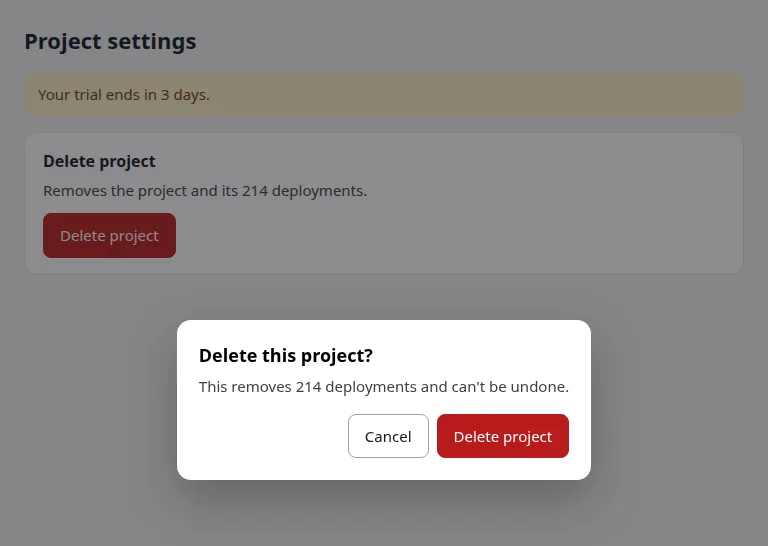
The <dialog> element is built into the browser. Opened with showModal() it sits in the top layer, puts a backdrop behind it, makes the rest inert, closes on Escape, and returns focus to the element that opened it. That is most of what a custom modal normally gets wrong. This is close to the markup of the fixed example page:
<dialog id="confirm" aria-labelledby="ct">
  <h2 id="ct">Delete this project?</h2>
  <p>This removes 214 deployments and can't be undone.</p>
  <form method="dialog" class="row">
    <button value="cancel" autofocus>Cancel</button>
    <button value="delete" class="danger">Delete project</button>
  </form>
</dialog>
A form with method="dialog" closes the dialog on submit and puts the clicked button's value in dialog.returnValue. Putting autofocus on Cancel makes the safe choice the default for a destructive action.
To keep the call sites as simple as if (confirm(...)), wrap it in a promise:
function confirmDialog({ title, message, confirmLabel = "OK" }) {
  return new Promise((resolve) => {
    const dlg = document.createElement("dialog");
    dlg.setAttribute("aria-labelledby", "cd-title");
    dlg.innerHTML = `
      <h2 id="cd-title"></h2>
      <p></p>
      <form method="dialog">
        <button value="cancel" autofocus>Cancel</button>
        <button value="ok" class="danger"></button>
      </form>`;
    dlg.querySelector("h2").textContent = title;
    dlg.querySelector("p").textContent = message ?? "";
    dlg.querySelector("[value=ok]").textContent = confirmLabel;
    dlg.addEventListener("close", () => {
      resolve(dlg.returnValue === "ok");
      dlg.remove();
    });
    document.body.append(dlg);
    dlg.showModal();
  });
}

// before: if (window.confirm("Delete this project?")) { ... }
// after:
if (await confirmDialog({ title: "Delete this project?", confirmLabel: "Delete" })) {
  await fetch("/api/projects/42", { method: "DELETE" });
}
Escape fires close with the returnValue unchanged (empty), so it resolves to false: cancelling by Escape is the same as pressing Cancel. The text is set with textContent, not interpolated into HTML, so a project name with markup in it can't inject anything. A prompt() replacement is the same pattern with an <input> inside the form and returnValue plus the input's value read on close.
Do you still need to manage focus and Escape?
If you use <dialog> with showModal(), mostly no. If you build a modal from divs, you do:
- Move focus into the dialog when it opens (the first field, or the close button).
- Close it on Escape.
- When it closes, call
.focus()on the element that opened it, so keyboard users don't land at the top of the page.
This is the WAI-ARIA dialog pattern and WCAG 2.4.3 (focus order). Hand-made modals are where it tends to go wrong, which is why renderlint checks it separately with dialog-focus.
How renderlint catches it
The rule is native-dialog (error by default, rule reference). renderlint finds native dialogs two ways. At runtime, when one opens while a page is checked, it records the call and where it was made, and answers confirm and prompt with Cancel. In source code, it finds window.confirm(…) and alert(…), which also catches the ones behind a click.
For the example page, a plain run at three widths found the alert() that opens on load:
✖ native-dialog (1)  The app uses the browser's own alert(), confirm() or prompt() box: a grey system dialog that blocks the page, ignores the app's design and can't be styled or translated. Found when one opens while a page is checked, and in source code (`window.confirm(…)`, `alert(…)`), which also catches the ones behind a click. The browser's "Leave site?" prompt from `beforeunload` is not flagged.
  error alert() "Your trial ends in 3 days" opened the browser's native dialog, called at /dialog-before.html:4:51. Replace it with the app's own toast or snackbar ("Saved"), or with an inline message next to the field for a form error. Use the toast/dialog component the project already has (search for one: sonner, react-hot-toast, a components/ui/dialog, MatDialog / MatSnackBar, ElMessageBox…) before adding a library.
        page /dialog-before.html · all viewports
The same page also calls confirm("Delete this project?") from a click handler. The plain run did not report it. A run with --ux, which clicks the page's buttons, reports two errors:
✖ native-dialog (2)  The app uses the browser's own alert(), confirm() or prompt() box: a grey system dialog that blocks the page, ignores the app's design and can't be styled or translated. Found when one opens while a page is checked, and in source code (`window.confirm(…)`, `alert(…)`), which also catches the ones behind a click. The browser's "Leave site?" prompt from `beforeunload` is not flagged.
  error alert() "Your trial ends in 3 days" opened the browser's native dialog, called at /dialog-before.html:4:51. …
        page /dialog-before.html · all viewports
  error confirm() "Delete this project?" opened the browser's native dialog, called at /dialog-before.html:5:72. Replace it with the app's own confirmation modal and continue only when the user confirms there (e.g. `if (await confirmDialog({ title: 'Delete this project?', confirmLabel: 'Delete' }))`, an AlertDialog with Cancel / Delete). Use the toast/dialog component the project already has (search for one: sonner, react-hot-toast, a components/ui/dialog, MatDialog / MatSnackBar, ElMessageBox…) before adding a library.
        page /dialog-before.html · at 375px
(The … stands for the rest of the alert message, which is the same as above.) The fixed page, with a role="status" notice instead of the alert and a <dialog> instead of the confirm, printed ✔ No UI defects found.
dialog-focus is a --ux warning. It checks the modal dialogs that its clicks open: <dialog> opened with showModal(), aria-modal, alertdialog, or a dialog over a full-screen overlay. It flags a dialog that leaves focus on the page behind it, doesn't close on Escape, or drops focus to the top of the page when it closes instead of returning it to the control that opened it. In the renderlint benchmark it flagged 3 of 3 bad hand-made modals and none of the 3 correct ones, including <dialog> with showModal(). renderlint never clicks "OK" or "Done" to close a dialog.
What isn't flagged?
- The browser's "Leave site?" prompt from
beforeunload. - A
useConfirm()hook, a component's ownconfirm()method, and Angular or Vue template bindings. - Lines marked
// renderlint-ignore native-dialogon the line above, for the rare case where a native dialog is intended.
Frequently asked questions
Is it ever fine to use confirm()?
For a quick internal script or a prototype, yes. In a product, it fails the checks above. If it is deliberate, mark it with // renderlint-ignore native-dialog.
Does the dialog element work in all browsers?
It is built into current browsers. If you must support one that lacks it, use your component library's dialog.
How do I replace prompt() when I need a value?
Use a <dialog> with a labeled input and a form with method="dialog". Read the input's value when the dialog closes.