A missing loading state is an area of the page that stays blank while its data loads, with no spinner, skeleton, progress bar or "Loading…" text. On your machine the API answers in 50 milliseconds, so you never see the blank. On a phone with a slow connection the page sits empty for seconds and looks broken. The way to test it is to hold the page's requests for a second, look at the screen, then release them and watch what moves.
- Dev machines hide the problem: the API is local and answers almost at once.
- Any visible sign counts as a loading state. What fails is a blank area.
- A skeleton the size of the final content also prevents layout shift.
- Clicks have the same problem as loads: no response for a second feels like a frozen page.
Why don't you see missing loading states while developing?
Because of speed. On a development machine the API runs next door, so the request finishes before the browser has painted the empty state. On a fast dev machine the API answers in 50ms, so a page with no loading state looks fine. The benchmark behind renderlint's loading checks uses a Vite and React app whose API answers in 60ms, like a dev machine.
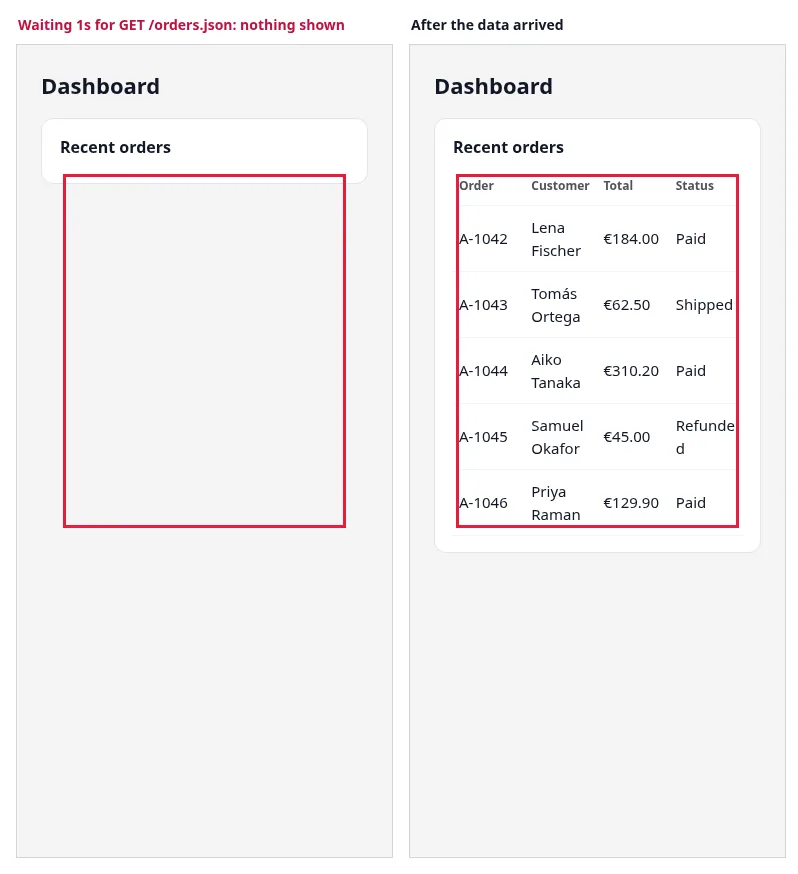
Users meet the other end of that range. The page paints its shell, fires a request, and has nothing to show until the response comes. If the code renders nothing for that area, the card looks empty. A common version:
fetch("orders.json")
  .then((r) => r.json())
  .then((rows) => {
    document.getElementById("orders").innerHTML = renderTable(rows);
  });
The container #orders starts empty. There is no pending state, no error path, and a failed request leaves the card blank forever.
What counts as a loading state?
Anything that tells the user something is on its way. renderlint accepts aria-busy, role="progressbar" or role="status", a running animation, motion on screen, "Loading…" or "Saving…" text, skeleton or spinner class names, and placeholder blocks where the content appears. It also recognizes canvas and SVG spinners, and spinners with hashed class names.
Skeleton or spinner? Both pass. A skeleton shaped like the content is better, because it holds the space the content will take, so nothing jumps when it arrives. A spinner is fine for small or unpredictable areas, but the container should still reserve a minimum height.
| Question | Skeleton | Spinner |
|---|---|---|
| Tells the user something is coming | Yes | Yes |
| Reserves space for the final content | Yes, if sized like it | Only with a min-height |
| Layout shift when data arrives | Low | Likely, unless space is reserved |
| Best for | Lists, tables, cards, dashboards | Buttons, small panels, unknown shapes |
| Needs an error state | Yes | Yes |
Whichever you choose, handle the failure path. A skeleton that never leaves the screen is its own defect.
How do you fix a blank loading area?
Render a state where the data will appear and clear it on success or failure. This is the fixed version of the page above, and it is the one renderlint passes:
<div id="orders" aria-busy="true">
  <div class="bone"></div>
  <div class="bone"></div>
  <div class="bone"></div>
</div>
<script>
  const box = document.getElementById("orders");
  fetch("orders.json")
    .then((r) => { if (!r.ok) throw new Error(r.status); return r.json(); })
    .then((rows) => { box.innerHTML = renderTable(rows); })
    .catch(() => {
      box.innerHTML = '<p role="alert">Orders could not be loaded. ' +
        '<button onclick="location.reload()">Try again</button></p>';
    })
    .finally(() => box.removeAttribute("aria-busy"));
</script>
In frameworks the same idea has names: isPending or isLoading with TanStack Query and SWR, a fallback on React Suspense, useNavigation() for React Router loaders, loading.tsx in Next.js. Render an error message when the request fails.
What is layout shift and why does it come with loading?
Layout shift is content moving after it has been painted. Cumulative Layout Shift (CLS) adds up those moves, and Core Web Vitals rates a CLS of 0.1 or less as "good" (web.dev). When data arrives into an empty container, everything below it is pushed down. Users lose their place or click the wrong button because it moved under their finger.
Things that cause it while loading:
- An empty container that grows when its data arrives.
- Images, video and embeds without
widthandheightoraspect-ratio. - A banner inserted above content that is already visible.
Reserve the space before the content arrives:
.orders { min-height: 320px; }          /* area filled by data */
.thumb  { aspect-ratio: 4 / 3; width: 100%; }  /* images and embeds */
.skeleton-row { height: 44px; }         /* skeleton the size of a row */
What about clicks, not only page loads?
The same blank-screen problem happens after a click. A button starts a request, and for a second nothing on screen changes. The page looks frozen, and users click again or leave. Nielsen's rule of thumb: about one second is the limit for the user's flow of thought to stay uninterrupted (Nielsen Norman Group).
The fix is the same shape as for loads: respond at once with a pending state on the control (a spinner, "Saving…", disabled) or where the result will appear, then show the result. Failures need the same care. If the request fails, nobody should be left with a spinner that never stops, or a "Settings saved" message that appeared because the code never checked response.ok.
How renderlint catches it
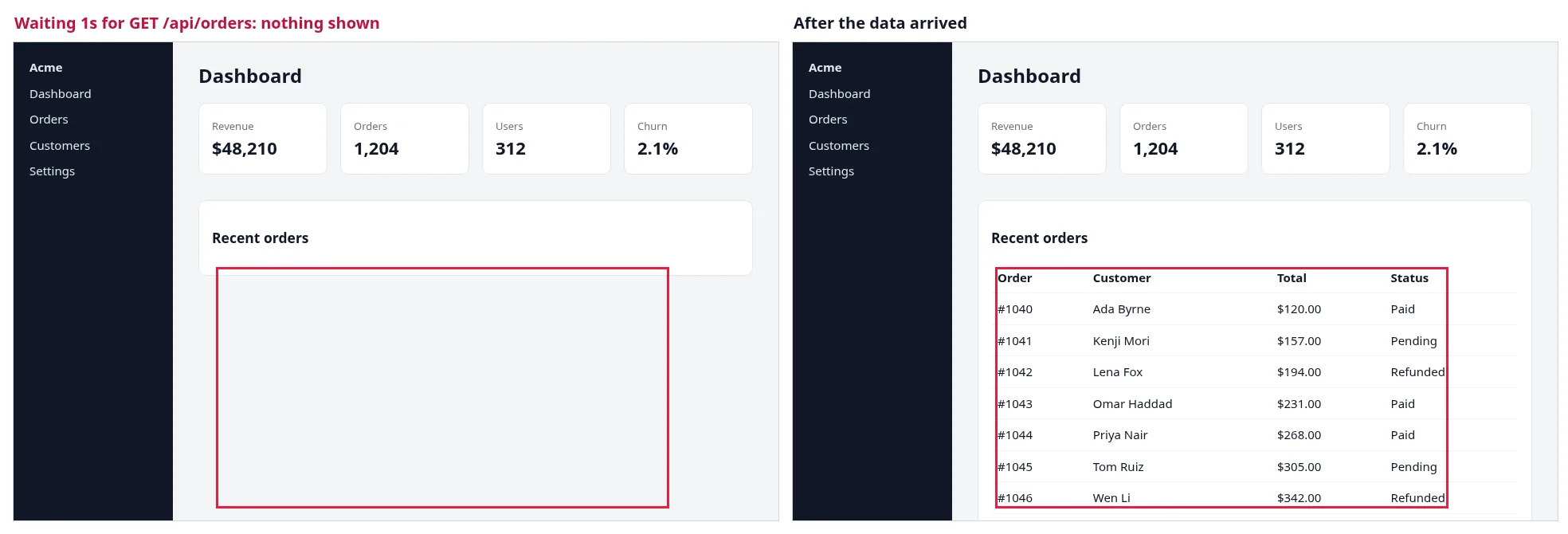
On every run, each page that loads data in the browser is reloaded with its fetch and XHR requests held for one second. renderlint looks at the page, releases the requests, and finds the areas the data filled. An area that showed nothing meanwhile is a loading-state warning. The same hold measures layout-shift: it warns above a CLS of 0.1.
This is the output for the example page. The run was at three widths; this finding is at 375px:
⚠ loading-state (1)  An area of the page stays blank while its data loads: no spinner, skeleton, progress bar or "Loading…" text, so on a slow connection the page looks empty, broken or frozen. renderlint reloads each page with its fetch/XHR requests held for a second (as on a slow network), looks at what is shown, releases them and finds the areas the data filled. Any loading sign on the page counts: aria-busy, role=progressbar/status, a running animation, motion on screen, "Loading…"/"Saving…" text, skeleton or spinner class names, placeholder blocks where the content appears. With `--ux`, also checked after each click.
  warn  While this page waited for its data (GET /orders.json; renderlint held it 1s, as on a slow network), the area where "Order · Customer · Total · Status" appears showed nothing: no spinner, skeleton, progress bar or "Loading…" text. On a slow connection the page looks empty or frozen. Render a loading state in #orders until the data arrives (a skeleton shaped like the content, or a spinner), and an error message if the request fails.
        at #orders  "Order Customer Total Status A-1042 Lena Fischer €184.00 Paid A-1043 T…"
        page /loading-before.html · at 375px
With --ux, renderlint also uses every kind of button, tab, in-app link, filter dropdown and form on each page (filled with test data), one of each repeated kind, each on a fresh load. action-feedback is the click that starts a request and shows nothing for a second. error-feedback answers the page's data requests, and each action's, with HTTP 500 and checks that something tells the user, instead of a spinner that never stops or a silent page. Requests that change data are answered by renderlint and never reach your server.
How accurate is the detection?
The detection was designed by measurement on a benchmark of 75 dashboard pages on a Vite and React 19 app: 41 pages written by the renderlint authors, 24 "blind" pages written by a separate agent that never saw the detector, and 10 pages for the other --ux checks. The methods compared:
| Method | Own set: caught · false alarms | Blind set: caught · false alarms |
|---|---|---|
| Loading words and ARIA only | 13/13 · 12 | 12/12 · 3 |
| Pixels only | 13/13 · 3 | 12/12 · 3 |
| DOM, plus animations, class names and placeholder boxes | 13/13 · 0 | 12/12 · 1 |
| DOM plus motion on screen (shipped) | 13/13 · 0 | 12/12 · 0 |
The shipped default run at 375px flagged all 13 broken page loads and nothing on the other 52 pages of the first two sets. --ux at 1280px caught every broken click and route change (6 in each set) and both main-thread freezes. It also found error-feedback on 11 pages that show a loading state but never handle a failed request.
What are the limits?
- The one
layout-shiftmiss in the benchmark was a promo banner that measured a CLS of 0.093 at 375px, just under the 0.1 threshold. At 1280px it measured 0.11 and was flagged. - The default run costs about 2.5s per page that loads data in the browser.
--uxtakes 5–15s per page on the benchmark. --uxuses at most 12 actions per page, one control of each kind, and no hover menus or drag and drop.- The look happens one second into the wait. A spinner that deliberately appears only after 400ms, to avoid a flash on fast responses, counts as a loading sign: the benchmark has such a page.
The loading-state and --ux findings are warnings, not errors, and each message names the request, the control and what to add.
Frequently asked questions
Does the default run click anything?
No. The default run reloads each page with its requests held. Broken clicks are left to --ux, because the default run doesn't click.
How long should a loading state take to appear?
At once for clicks. renderlint looks one second into the wait because that is Nielsen's limit for keeping the user's flow.
Is a skeleton always better than a spinner?
For areas with a known shape, yes: it reserves the space and reduces layout shift. For a button waiting on a save, a spinner or "Saving…" label is the right size.