renderlintv0.2.0
Open source, MITVersion 0.2.0 · Read the changelog

A linter for the rendered UI

renderlint opens your app in a real browser, finds the visual defects coding agents ship, and fails the build until they’re fixed. TypeScript and ESLint can’t see these bugs, because the code is fine. It’s the pixels that are wrong.

229 → 0errors across 22 Claude Code sessions: 11 apps without renderlint, 11 with it
npx -y @yitec/renderlint init
Star on GitHub
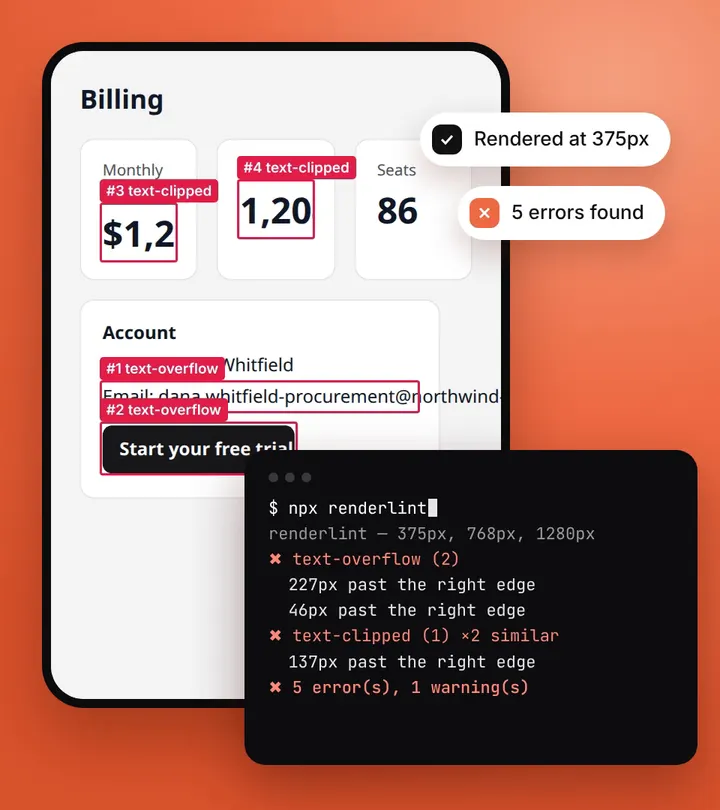
renderlint’s check of a billing page at 375px: four elements boxed in red (an email and a button label spilling out of their card, two KPI values cut off), next to a terminal reporting 5 errors

Works with anything that renders in a browser, including

  • Next.js
  • React
  • Vue
  • Nuxt
  • Svelte / SvelteKit
  • Astro
  • Angular
  • React Router / Remix
  • TanStack Router
  • Vite
  • Storybook
  • Playwright
  • WordPress
  • Elementor
  • Claude Code
  • GitHub Actions
What it is

What is renderlint?

renderlint is a command-line linter that renders every page of a web app in headless Chromium, measures what is actually drawn, and reports visual defects with the element, the source file, an annotated screenshot and a concrete fix, in plain text a coding agent can act on.

52
rules, tuned so that a finding is almost always a real defect
3 + 13
viewports (375, 768, 1280px) plus a sweep of 13 widths from 320 to 1920px
0
baseline images to approve: each page is judged on its own
+50%
longer text, plus long words and bigger numbers, to catch layouts that break with real data
Before and after

Real bugs, real output, real fixes

Each “before” is renderlint’s own annotated screenshot and report from a run on that page. Each “after” is the same page with the fix from the report applied, at 0 errors. Nothing here is mocked up.

Text that doesn’t fit its box

text-overflow text-clipped

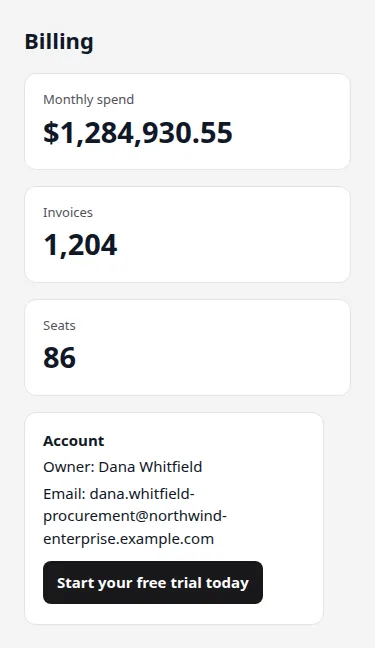
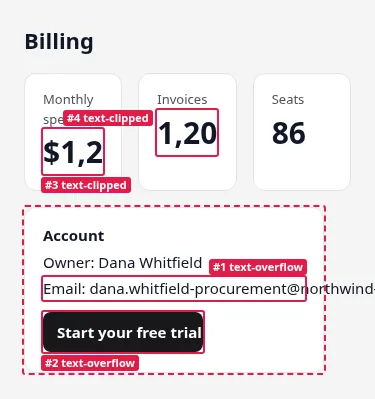
renderlint’s annotated screenshot at 375px: the Monthly spend and Invoices values cut off inside their cards (boxes 3 and 4, text-clipped), the email running past the account card and the button label cut off (boxes 1 and 2, text-overflow)
Before renderlint’s annotated screenshot
The fixed billing page at 375px: the cards stack, the full value $1,284,930.55 is shown, the email wraps inside the account card and the button fits its label
After 0 errors

A billing page at 375px: a long email and a button label spill out of their card, and two KPI values are cut off by theirs.

✖ text-clipped (1)
  error Text is cut off by an overflow:hidden container (137px past the right edge). (×2 similar elements)
        at main > div.grid:nth-of-type(1) > div.card.kpi:nth-of-type(1) > div.v:nth-of-type(2)  "$1,284,930.55"
✖ text-overflow (2)
  error Text spills outside its container (227px past the right edge).
        at main > div.card.acct:nth-of-type(2) > p:nth-of-type(2)  "Email: dana.whitfield-procurement@northwind-enter…
  …
✖ viewport-overflow (1)
⚠ fragile-layout (1)

✖ 5 error(s), 1 warning(s)

Content no one can scroll to

unreachable-content

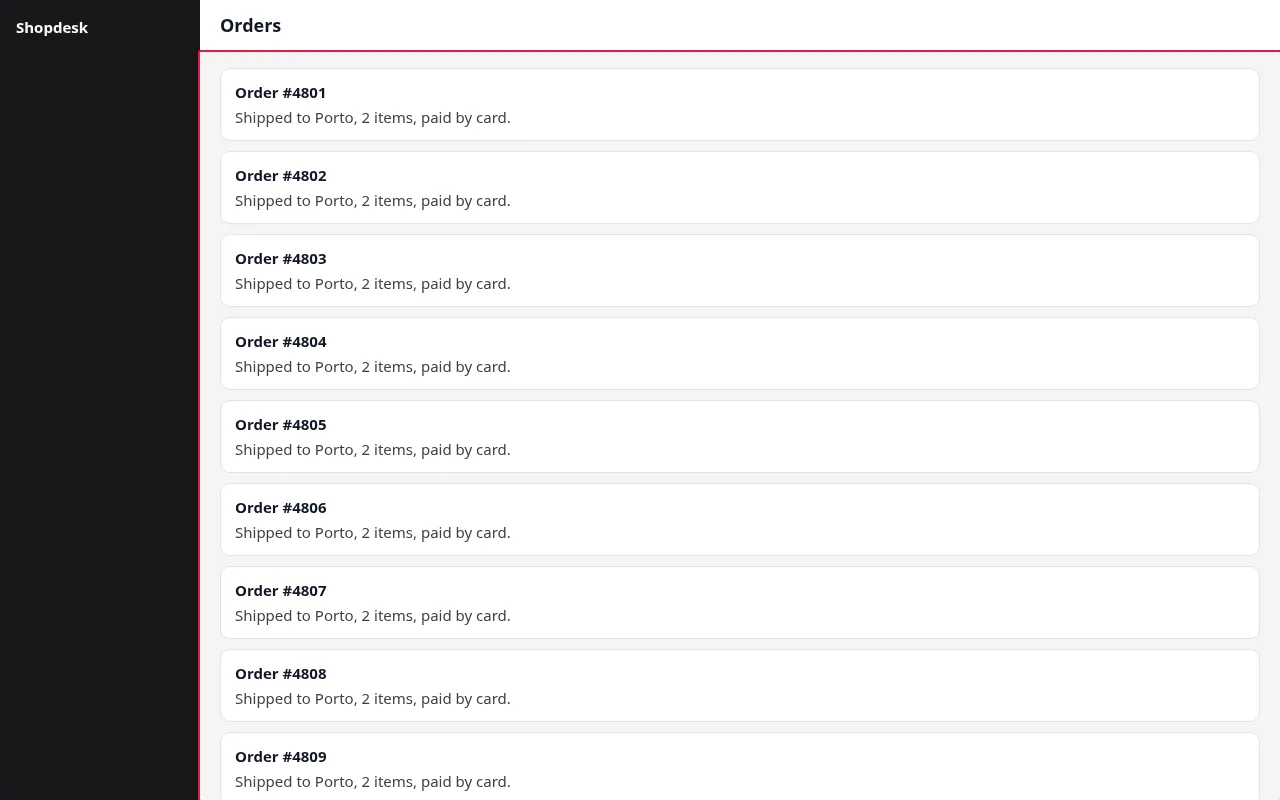
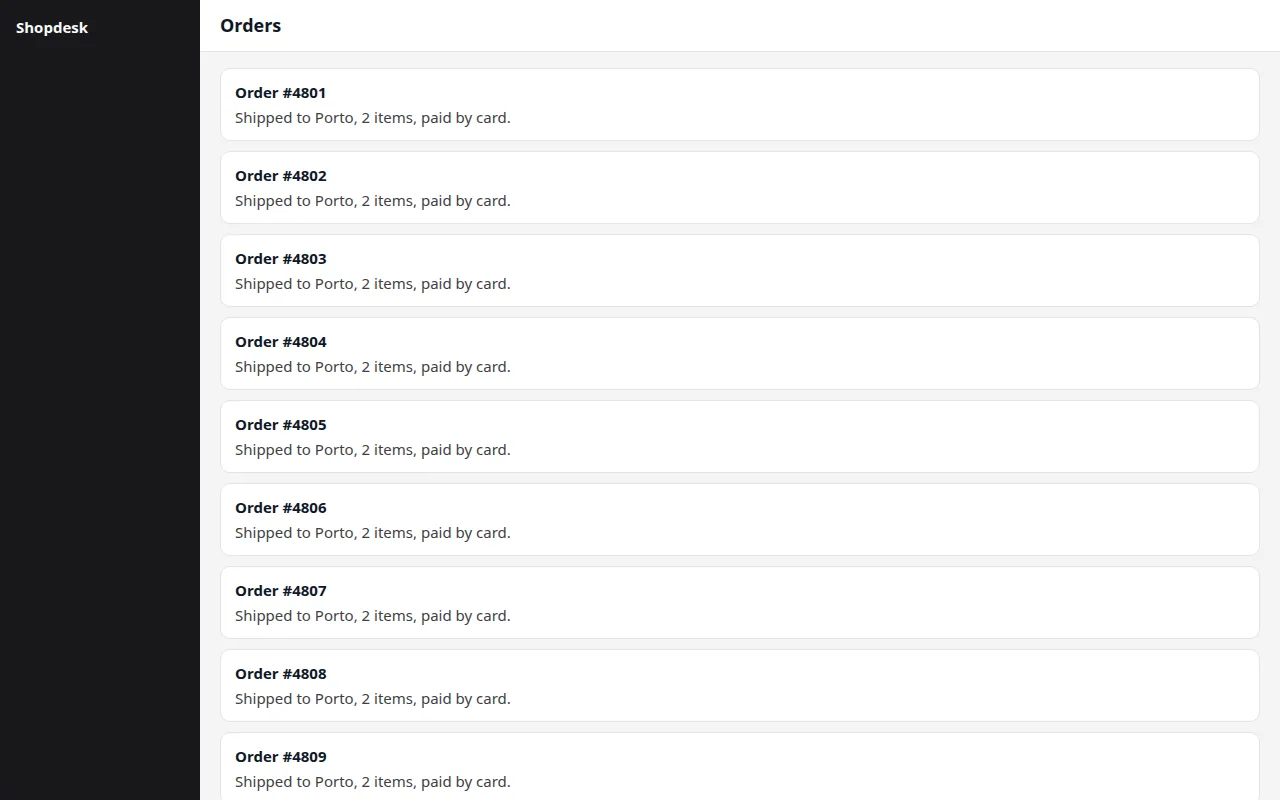
renderlint’s screenshot of an orders screen at 1280px: a dark sidebar and a column of order cards that stops at the bottom edge of the window, outlined in red as unreachable-content
Before renderlint’s annotated screenshot
The fixed orders screen at 1280px: the same list, now inside a scrolling area
After 0 errors

An app shell with height: 100vh; overflow: hidden. The orders list grows past the screen, but its area is not a scroller.

✖ unreachable-content (1)
  error Content can't be scrolled to: 30 pieces of text, reaching 1224px below the bottom of this box (overflow-y: hidden), and neither it nor anyt…
        at div.app > div.mainc > section  "Order #4801 Shipped to Porto, 2 items, paid by card. Order #4802 Ship…"

✖ 1 error(s), 0 warnings

White text on a light gradient

contrast

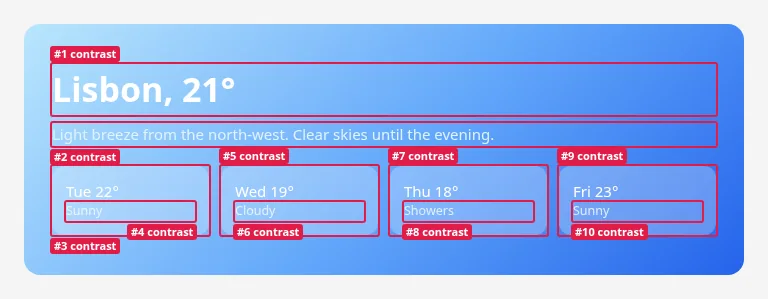
renderlint’s screenshot at 768px: a weather card on a light-blue gradient, with the title, the description and each day tile boxed in red as contrast errors
Before renderlint’s annotated screenshot
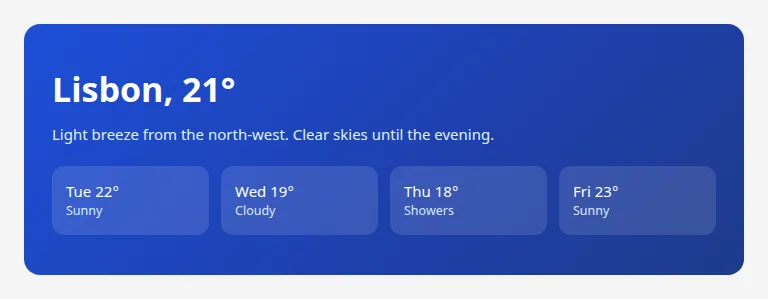
The fixed weather card at 768px: the same white text on a dark blue gradient
After 0 errors

Every text on this weather card is white or near-white over a sky-blue gradient. Measured from the pixels behind each glyph, none reaches WCAG AA.

✖ contrast (10)
  error Low text contrast: 1.64:1, needs 3:1 — #ffffff on a non-uniform background (≈#9bd0fc).
        at main > section.hero > h1  "Lisbon, 21°"
  error Low text contrast: 1.59:1, needs 4.5:1 — #e0f2fe on a non-uniform background (≈#8dc5fb).
        at main > section.hero > p  "Light breeze from the north-west. Clear skies until the evening."
  …

✖ 10 error(s), 0 warnings

See all examples

Coverage

What does renderlint catch?

Defects that pass type checks, linters and code review, because the code is valid. It is the rendering that is wrong, often only at one width or with longer content than the sample data.

What you seerenderlint rule
Longer text pokes out of a card, button or badge, or runs right up to its bordertext-overflow text-clipped text-crowding
A layout that fits today’s sample copy but breaks with real datafragile-layout
Gray-on-gray or white-on-yellow text you can barely read (measured from real pixels, so it works on gradients and images)contrast
Elements overlap when the window shrinks, instead of wrappingelement-overlap viewport-overflow content-overflow
Chart and diagram labels collide or get cut off (SVG charts)text-overlap text-clipped
A page or tab you can’t scroll: an overflow: hidden app shell, a fixed-height card hiding its list, a scroll lock left onunreachable-content
A fixed header covers the hero, or a decoration covers a buttonobscured-content
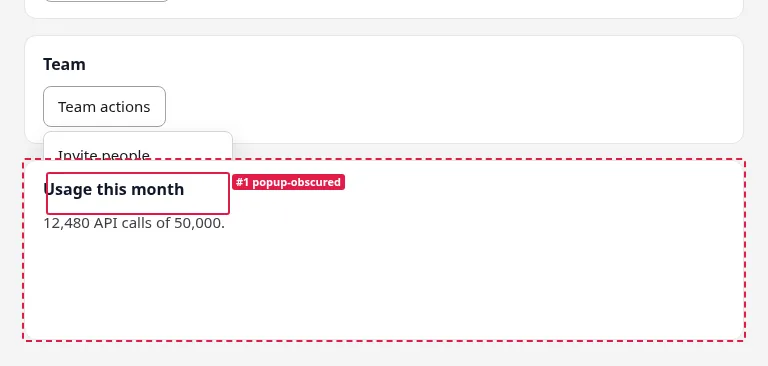
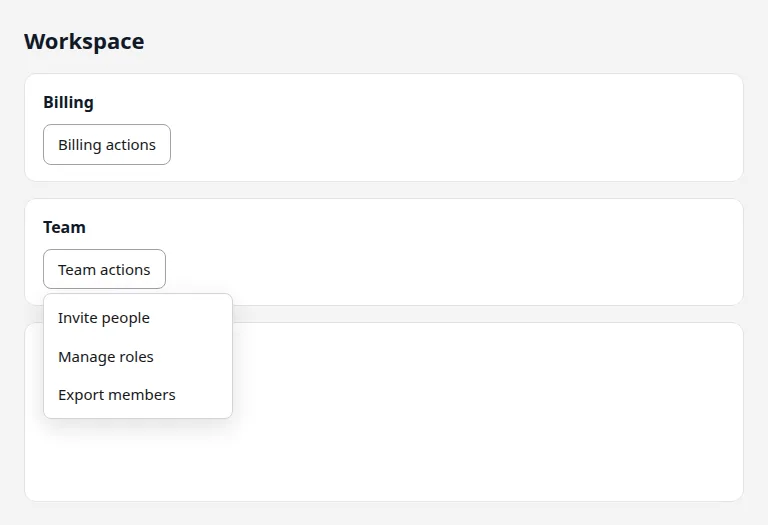
A dropdown that opens behind the next card, or is cut off by its card or a table’s scroll boxpopup-obscured
Emoji used as icons instead of a proper icon setemoji
undefined, NaN, [object Object], Invalid Date, lorem ipsumplaceholder-text
Broken or stretched images, giant unsized SVG iconsbroken-image image-distortion oversized-icon
A dropdown arrow on the border, a checkbox floating above its label, an icon over the placeholder, a squashed inputdropdown-arrow checkbox-layout input-icon-overlap squashed-control
alert() and confirm(): the browser’s grey system box instead of the app’s own toast or modalnative-dialog
A card that stays blank while its data loads, then pops in; content that jumps when it arrivesloading-state layout-shift
With --ux: a click with no feedback for a second, a failed save nobody is told about, a double submit, a dead button, a freezeaction-feedback error-feedback double-submit dead-control ui-freeze
No viewport meta, a pointless 3px scrollbar, href="#" links, no focus ring, tiny tap targetsmissing-viewport-meta accidental-scrollbar dead-link focus-indicator tap-target
Hydration errors, crashes, 404s, pages that only showed the login form or “Access denied”console-error page-error broken-resource auth-required page-not-shown

All 52 rules with their fixes

Method

How does it work?

Static analysis can’t know that a German heading is wider than its card at 1024px. renderlint renders the page and measures it.

  1. Render

    Each page loads in headless Chromium at each viewport, and in dark mode if your CSS has one. Lazy content and scroll-reveal animations are triggered, fonts and images awaited.

  2. Measure

    An analyzer in the page compares the rect of every text run with its containers and clip boxes, checks intersections and hit-tests for what covers what.

  3. Look at the pixels

    For contrast, the page is captured twice, once with text made transparent, to get the real background behind each glyph: gradients, images, overlays.

  4. Stress

    The layout rules run again at the sweep widths, then with longer text, long words, bigger numbers and longer API data.

  5. Report

    Findings are merged across viewports and pages, mapped to a component or file, and given a fix hint and a numbered screenshot.

Evidence

Does it work?

22 headless Claude Code sessions (Opus and Haiku) each built a typical frontend in HTML, React, Next.js, Vue or Svelte. Half also got the one-line renderlint setup prompt.

229errors in the 11 baseline apps, mostly WCAG contrast failures, plus emoji icons and clipped chart labels
0errors in the 11 apps built with renderlint: the agents fixed the issues themselves
13/13 · 12/12missing loading states caught on a 75-page benchmark, including 24 pages written blind by a separate agent, with no false alarms
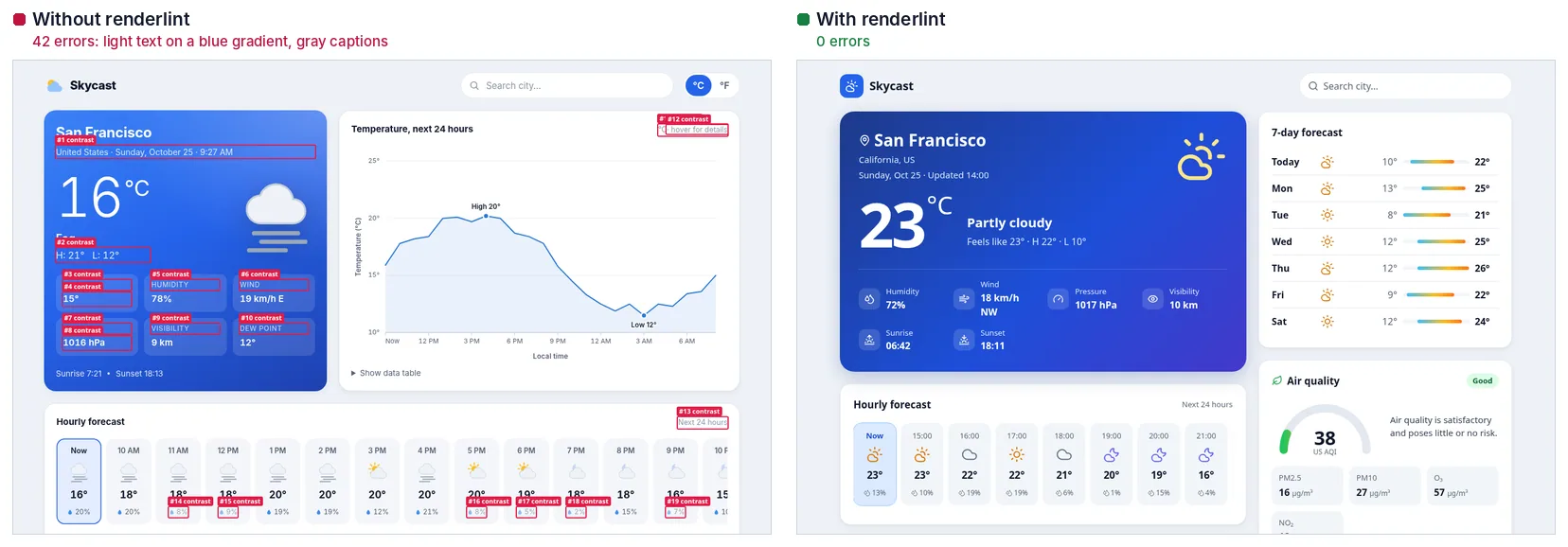
The same weather-app prompt in two Claude Code sessions: on the left, without renderlint, 42 contrast errors boxed; on the right, the session that ran renderlint and fixed its findings
The same weather-app prompt in two sessions. Left: no renderlint, 42 errors. Right: the session that ran renderlint and fixed its own findings. Details in docs/results.md.
Comparison

How does it compare with other tools?

renderlint doesn’t replace your other tools. It covers the gap between “the code is valid” and “the page looks right”.

ToolReadsOverflow, overlap, clippingContrast on gradients and imagesNeeds a baselineTells you the fix
ESLint, stylelint, TypeScriptSource codeNoNoNoYes, for code issues
axe-core, LighthouseDOM and computed CSSNoReported as “needs review”NoYes, for accessibility rules
Visual regression (Percy, Chromatic, BackstopJS, Playwright screenshots)Pixels, against approved imagesOnly as a diff from the baselineOnly as a diffYes: a defect in the first version becomes the baselineNo: shows what changed, not what’s wrong
renderlintRendered geometry and pixelsYes, at every width and with stressed contentYes, from the real pixels behind each glyphNoYes: element, source file, screenshot and fix

Visual regression testing vs rendered-UI linting

Gates

Make it impossible to ship defects

renderlint exits non-zero when it finds errors, so you can gate any step on it. init sets up the first three for you.

Any build

Append the check to your build script, for any framework.

"build": "vite build && renderlint dist"

Claude Code

A Stop hook: Claude can’t end its turn while UI errors remain in files it changed. It gives up after 4 attempts.

npx renderlint hook

Other agents

The workflow goes into AGENTS.md, read by Codex, Cursor, Copilot, Gemini CLI, Amp and Zed, plus three skills.

npx -y @yitec/renderlint init

Vite

A live overlay in dev with source file and line; vite build fails on errors.

import renderlint from '@yitec/renderlint/vite'

CI

Inline annotations on pull requests in GitHub Actions.

npx renderlint dist --format github

Playwright and Storybook

Check every state your e2e tests reach, or every story.

export const test = withRenderlint(base)
FAQ

Frequently asked questions

Short answers. The README and docs have the details.

What is renderlint?

renderlint is an open-source (MIT) linter for the rendered UI. It opens a web app in headless Chromium at phone, tablet and desktop widths, finds visual defects such as text overflowing its box, low contrast, overlapping elements, unreachable content and menus that can’t be seen, and exits with code 1 until they are fixed. Each finding names the element, the source file, an annotated screenshot and a fix.

How is it different from ESLint, axe or Lighthouse?

ESLint, stylelint and TypeScript read source code, so they can’t see that text spills out of a card. axe-core and Lighthouse read the DOM and computed CSS, so they don’t catch overflow, overlap or clipping, and they report contrast over gradients and images as “needs review”. renderlint measures the rendered geometry and the real pixels behind each glyph.

Is it a visual regression testing tool?

No. Visual regression tools (Percy, Chromatic, BackstopJS, Playwright screenshots) compare pixels against approved images, so a defect in the first version becomes the baseline, and they show what changed rather than what is wrong. renderlint needs no baseline: it judges each page on its own. Use visual regression for unintended changes to an approved design, and renderlint for defects in pages nobody has approved yet.

Which frameworks does it support?

Anything that renders in a browser: React, Next.js, Vue, Nuxt, Svelte and SvelteKit, Astro, Angular, Solid, Qwik, Remix, WordPress and plain HTML. It reads routes from the source of Next.js, Nuxt, SvelteKit, Astro, React Router / Remix, TanStack Router, Angular and Vue Router apps.

Can it check pages behind a login?

Yes. Give it the token your route guard reads and mock the API, log in once through your real form, or run a script for SSO. With roles, every page is checked as each role. A page that only showed the login form or “Access denied” is reported as auth-required or page-not-shown, never passed.

How do I use it with Claude Code and other coding agents?

Run npx -y @yitec/renderlint init. It adds a Claude Code Stop hook, so Claude can’t end its turn while UI errors remain in files it changed (it gives up after 4 attempts), writes the workflow into AGENTS.md for Codex, Cursor, Copilot, Gemini CLI and others, and installs three skills for setup, fixing and Playwright/Storybook.

How long does a check take?

A single page takes about 4 to 10 seconds at three viewports with the sweep and stress passes. Pages are checked side by side, and pages that render identically share their checks. Use --sweep 1024 or --no-sweep for a faster inner loop.

What can’t it check?

Labels inside <canvas> charts are pixels, so they can’t be inspected. What sits behind clicks (dialogs, tabs, filled forms) is only linted when you list it in states or reach it in a Playwright test. Contrast follows the WCAG 2 AA formula, not APCA. Server mocks are Node only.
Blog

Guides to the bugs it catches

How each defect happens in the browser, how to fix it, and how to catch it before it ships.

All articles

Paste one line into your coding agent

“Set up renderlint in this project: run npx -y @yitec/renderlint init, then follow the ‘UI quality gate: renderlint’ section it adds to AGENTS.md: after every UI change run npx renderlint and fix every reported error until it shows 0 errors.”

npx -y @yitec/renderlint init