A dropdown is cut off for one of two reasons. Either an ancestor with overflow: hidden (or auto) clips it, or another element is painted on top of it because the menu's z-index only counts inside a stacking context that sits below that element. Raising the menu's z-index fixes neither. The reliable fix is to move the menu out of the ancestor that clips or traps it: a portal, the top layer, or a layout without the clipping.
- A menu that is
position: absoluteis clipped by an ancestor withoverflowother thanvisiblewhen that ancestor is its containing block or contains it. - A
z-indexof 9999 on the menu is compared only with its siblings inside the same stacking context. - A transform, filter or similar on an ancestor changes what
position: fixedmeans for the menu. - Menus are usually closed when you build the page, so you never see the defect unless you open them.
Why does overflow: hidden cut off my dropdown?
An absolutely positioned menu is drawn relative to its containing block, the nearest positioned ancestor. Clipping follows the containing-block chain too, but in the other direction: an ancestor whose overflow is not visible clips the menu if it is the menu's containing block or contains it. (A non-positioned ancestor that sits between the menu and its containing block does not clip it.) A card with overflow: hidden (often there to round the corners of an image) therefore cuts off a menu that opens below its last line.
<section class="card">            <!-- overflow: hidden; height: 96px -->
  <h2>Billing</h2>
  <div class="dd">                <!-- position: relative -->
    <button aria-haspopup="menu" aria-controls="m1">Billing actions</button>
    <ul role="menu" id="m1">...</ul>   <!-- position: absolute; z-index: 50 -->
  </div>
</section>
The menu has z-index: 50 and it still does not help, because z-index decides what is painted on top of what, not what is allowed to leave a box. overflow: auto and overflow: scroll do the same, which is why dropdowns inside table wrappers (overflow-x: auto) are a classic case. Setting overflow-x: auto also makes overflow-y compute to auto, so you cannot clip only one axis and let the other show.
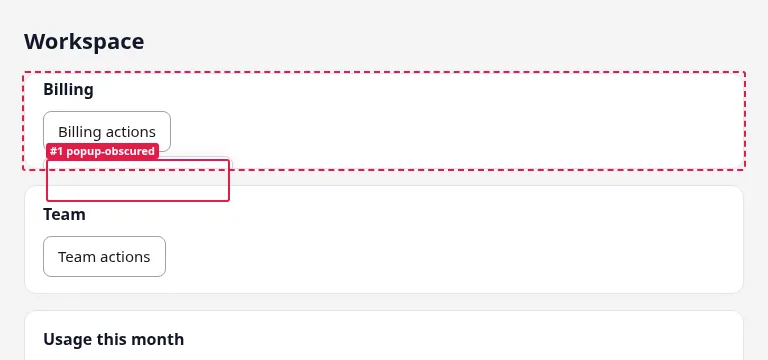
overflow: hidden. renderlint boxes where the options should be.Why is my dropdown hidden behind another element even with a high z-index?
Because z-index is not global. An element with position and a z-index other than auto creates a stacking context, and everything inside it is painted as one unit at that z-index. The menu's z-index: 50 is compared only against other things inside the same context. The context itself is compared with its siblings.
This is the situation with the Team and Usage cards in the example. They are positioned siblings with z-index: 1 and z-index: 2. The menu belongs to the first card. The first card sits below the second one, so the menu is below it as well, whatever number the menu has.
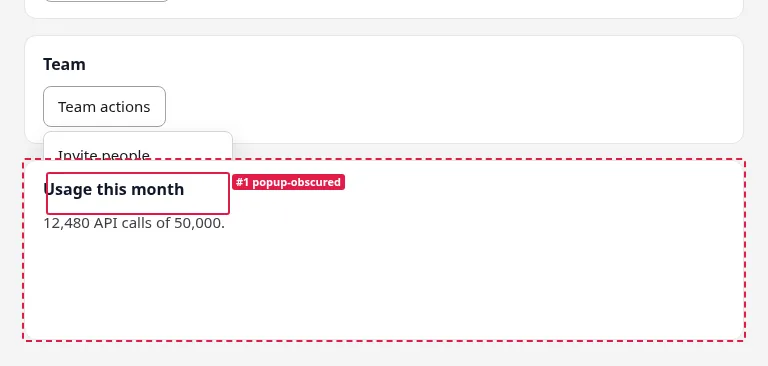
Properties that create a stacking context, beyond position plus z-index:
| Property on the ancestor | Creates a stacking context | Also makes position: fixed children relative to it |
|---|---|---|
z-index on a positioned element (or a flex/grid item) |
Yes | No |
opacity below 1 |
Yes | No |
transform (any value but none) |
Yes | Yes |
filter (any value but none) |
Yes | Yes |
isolation: isolate |
Yes | No |
will-change: transform |
Yes | Yes |
overflow: hidden |
No | No |
overflow is a clipping problem, not a stacking one. A transform, on the other hand, is both: it traps the menu in its own stacking context and it becomes the containing block for position: fixed descendants.
Does position: fixed escape overflow: hidden?
Usually yes. A fixed element is positioned against the viewport and is not clipped by ancestors' overflow. That is why "make the menu fixed" is a popular fix. It fails when any ancestor has a transform, filter or will-change: transform. That ancestor becomes the containing block, so the fixed menu is positioned and clipped relative to it, as if it were absolute. Animated cards with a transform: translateY(0) hover effect are a common way to break a fixed menu by accident.
The fix text for this rule mentions Floating UI with strategy: "fixed" for use outside transformed ancestors.
How do you fix a clipped or hidden dropdown?
Pick the least invasive option that works for your layout.
Remove the clipping. If
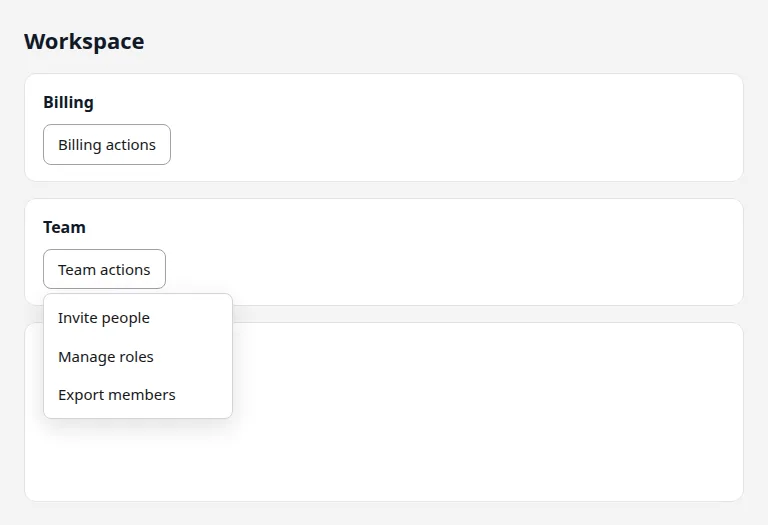
overflow: hiddenwas only there for rounded corners or a clearfix, drop it, or move it to an inner wrapper that does not contain the menu. In the fixed version of the example the clipping card has nooverflow: hiddenand no fixed height.Raise the ancestor, not the menu. When a card is the stacking context, give the card the higher z-index while the menu is open:
.card:has([aria-expanded="true"]) { z-index: 10; }This is the fix used in the "after" version of the example page, which also drops the fixed z-indexes on the cards. It is simple, but it depends on
:has()and on the card staying a sibling of the others.Render the menu somewhere else. A portal appends the menu to
document.body(Radix and shadcnPortal, MUI Popper and Menu which portal by default, Angular CDK Overlay, Headless UI'sanchor). Then no ancestor can clip it. You position it from the trigger's bounding box, which is what Floating UI does.Use the top layer. The
popoverattribute puts the element in the browser's top layer, above everything regardless of z-index or ancestors' overflow:<button popovertarget="team-menu">Team actions</button> <ul id="team-menu" popover role="menu"> <li><button role="menuitem">Invite people</button></li> </ul>A modal
<dialog>opened withshowModal()is in the top layer too. A popover gives you light dismiss (click outside, Escape) but not the positioning: you still anchor it yourself or with a library.
| Approach | Escapes overflow clipping |
Escapes stacking contexts | Cost |
|---|---|---|---|
| Raise the menu's z-index | No | No | None, and it does not work |
| Raise the ancestor's z-index while open | No | Partly (against siblings) | One CSS rule |
position: fixed |
Yes, unless a transformed ancestor | Only within its context | Needs a scroll/resize update |
Portal to body |
Yes | Yes | Positioning code or a library |
popover attribute / top layer |
Yes | Yes | You still position it |
How do you test dropdowns automatically?
A static check of the CSS can't answer this reliably: whether a menu is visible depends on its open size, its ancestors' clipping boxes and the paint order at that spot. The dependable way is to open the menu and look at it, at the widths where the layout changes.
The same page can be fine at 1280px and broken at 375px because the card is shorter or the next card moves under the trigger. Check each width.
How renderlint catches it
The rule is popup-obscured (error by default, rule reference). renderlint opens the menu triggers on each page: aria-haspopup, comboboxes, Bootstrap dropdowns and <details>. It opens two of each repeated kind, at most 8 a page, and closes each menu again with Escape. It then checks that the options can be seen. It follows containing blocks (a transformed ancestor traps a position: fixed menu) and, for a menu drawn underneath, it names the ancestor whose stacking context traps it. Each finding has a screenshot of the open menu.
This is the real output for the example page, at 375, 768 and 1280px:
✖ popup-obscured (2)  An open dropdown, menu, listbox or popover can't be seen: it is cut off by a container's `overflow: hidden` / `auto` (a card, a table wrapper), or drawn underneath a later element because of z-index and stacking order. renderlint opens the menu triggers on each page (`aria-haspopup`, comboboxes, Bootstrap dropdowns, `<details>`) to check, and checks menus already open in `states` and Playwright tests.
  error The open menu of "Billing actions" is cut off by main > div.cards > section.card.clip:nth-of-type(1) (overflow: hidden): 3 of 3 options can't be seen.
        at #m1 > li:nth-of-type(1) > button  "Download invoice"
      with main > div.cards > section.card.clip:nth-of-type(1)  "Billing Billing actions Download invoice Change pl"
        page /menu-before.html · all viewports · see .renderlint/screens/menu-before-html-vzm6w@375-menu1.png #1
  error The open menu of "Team actions" is drawn underneath another element (2 of 3 options hidden behind main > div.cards > section.card.stack:nth-of-type(3)). Its z-index only counts inside main > div.cards > section.card.stack:nth-of-type(2) (z-index: 1), which sits below that element.
        at #m2 > li:nth-of-type(2) > button  "Manage roles"
      with main > div.cards > section.card.stack:nth-of-type(3)  "Usage this month 12,480 API calls of 50,000."
        page /menu-before.html · all viewports · see .renderlint/screens/menu-before-html-vzm6w@375-menu2.png #1
The second message is the useful one: it says the menu's z-index "only counts inside" the card that is the stacking context. After the fix the run printed ✔ No UI defects found.
menus: false in the config turns the opening off, so only menus that are already open (in states or a Playwright test) are checked. One of the documented limitations is that --ux doesn't use hover menus; a states entry can reach one, since it accepts hover. If a finding is intentional, mark the element with data-renderlint-ignore="popup-obscured" and a data-renderlint-reason.
Frequently asked questions
Does a bigger z-index ever fix a hidden dropdown?
Only when the menu and the element covering it are in the same stacking context. If an ancestor of the menu starts its own context, give that ancestor the higher z-index, or take the menu out of it.
Is overflow: clip different from overflow: hidden?
Both clip. overflow: clip does not create a scroll container, but a menu inside it is cut off all the same.
Should every dropdown be portaled?
Not necessarily. A menu with room inside its card and no clipping ancestor works fine in place. Portals matter for menus in cards, tables, sidebars and modals, where clipping and stacking are most likely.